




How to use AI to proofread English texts: free guide
How to use AI to proofread English texts: free guide
How to use AI to proofread English texts: free guide
Written by: Luan Cavallaro, Founder & CMO, BeConfident
Key takeaways from this article
Grammatical errors can harm your career, and free AI tools like Grammarly and ChatGPT help correct these issues quickly.
Using specific prompts for different contexts, such as professional emails or technical reports, increases feedback accuracy by about 60%.
Following the 5-step workflow—paste the text, apply the prompt, analyze explanations, practice speaking, and test in conversation—produces more consistent learning.
Combining tools like Grammarly for basic corrections, ChatGPT for rewriting, and BeConfident for oral practice with instant feedback creates a complete package.
To seek complete fluency, it is worth trying BeConfident for free and integrating text review with 24/7 conversation.
Before you begin: what you need to know
This guide works best for those with an intermediate level of English, access to free AI apps, and the availability to practice 10 to 15 minutes a day. Studies from 2026 indicate that the strategic use of AI for feedback on texts accelerates fluency development in just a few weeks.
The most common mistake is translating texts without understanding the grammatical patterns. Portuguese speakers frequently confuse word forms because of incorrect suffixes, such as using "confident" (adjective) when they need "confidence" (noun). To reduce this type of error, it is useful to choose tools that explain the reason behind each correction.
Best AI tools for proofreading English texts
The table below compares the main free tools available in 2026, focusing on text proofreading and learning support:
Tool | Free plan | Accuracy/features | Ideal for |
|---|---|---|---|
Grammarly | Unlimited but basic | 4.9/5 for proofreading, tone detection | General and professional use |
DeepL Write | Yes | Natural rewording, style adjustment | Clarity and fluidity |
ChatGPT | Yes | Deep rewriting, detailed explanations | Customized prompts |
BeConfident | Free trial, affordable monthly fee | Feedback in chats, pronunciation support | Conversation and speaking |
Grammarly offers unlimited grammar and spelling checks on the free plan, with basic tone detection, while ChatGPT allows personalized paraphrasing and rewrites. BeConfident stands out for conversational texts and speaking practice, offering instant feedback in chats and supporting a consolidated user base.
10 ready-made prompts to review English texts
These prompts work well in tools like ChatGPT and other English text AIs:
Professional emails: "Review this email in English: [paste text]. Correct grammar, improve the professional tone, and explain the main errors."
Technical reports: "Analyze this technical text in English: [paste text]. Correct terminology, improve clarity, and suggest more precise vocabulary."
Presentations: "Review this presentation: [paste text]. Make the text more persuasive, correct errors, and suggest transitions between ideas."
Social media posts: "Correct this post: [paste text]. Keep a casual tone, correct grammar, and suggest relevant hashtags."
Motivation letters: "Review this letter: [paste text]. Improve the impact, correct errors, and make the text more convincing."
Academic articles: "Analyze this academic text: [paste text]. Correct grammar, improve the argumentation, and suggest formal vocabulary."
Commercial proposals: "Review this proposal: [paste text]. Make the text more persuasive, correct errors, and improve the structure."
WhatsApp messages: "Correct this message: [paste text]. Keep it natural and correct basic errors."
Resumes: "Review this resume: [paste text]. Correct grammar, improve the impact, and suggest action verbs."
Creative texts: "Analyze this creative text: [paste text]. Correct errors, improve flow, and maintain creativity."
Structured prompts with specific context generate feedback that is about 60% more accurate than vague instructions. Because of this, it is always worth specifying the type of text, audience, and objective.
Recommended 5-step workflow
This 5-step workflow organizes the use of AI tools and connects written proofreading with speaking practice:
Paste the text into the chosen tool, using Grammarly for basic corrections and ChatGPT for a deeper rewrite. This step centralizes content in one single place.
Use the specific prompt from the previous list according to the objective of the text. This choice guides the AI, defines the tone, and increases the relevance of the corrections.
Analyze the explanations of the errors to identify recurring patterns and understand the reason for each adjustment. This understanding reduces the chance of repeating the same mistake in the future.
Practice speaking the revised text out loud to build muscle memory of the correct structures. This practice turns passive knowledge into active use.
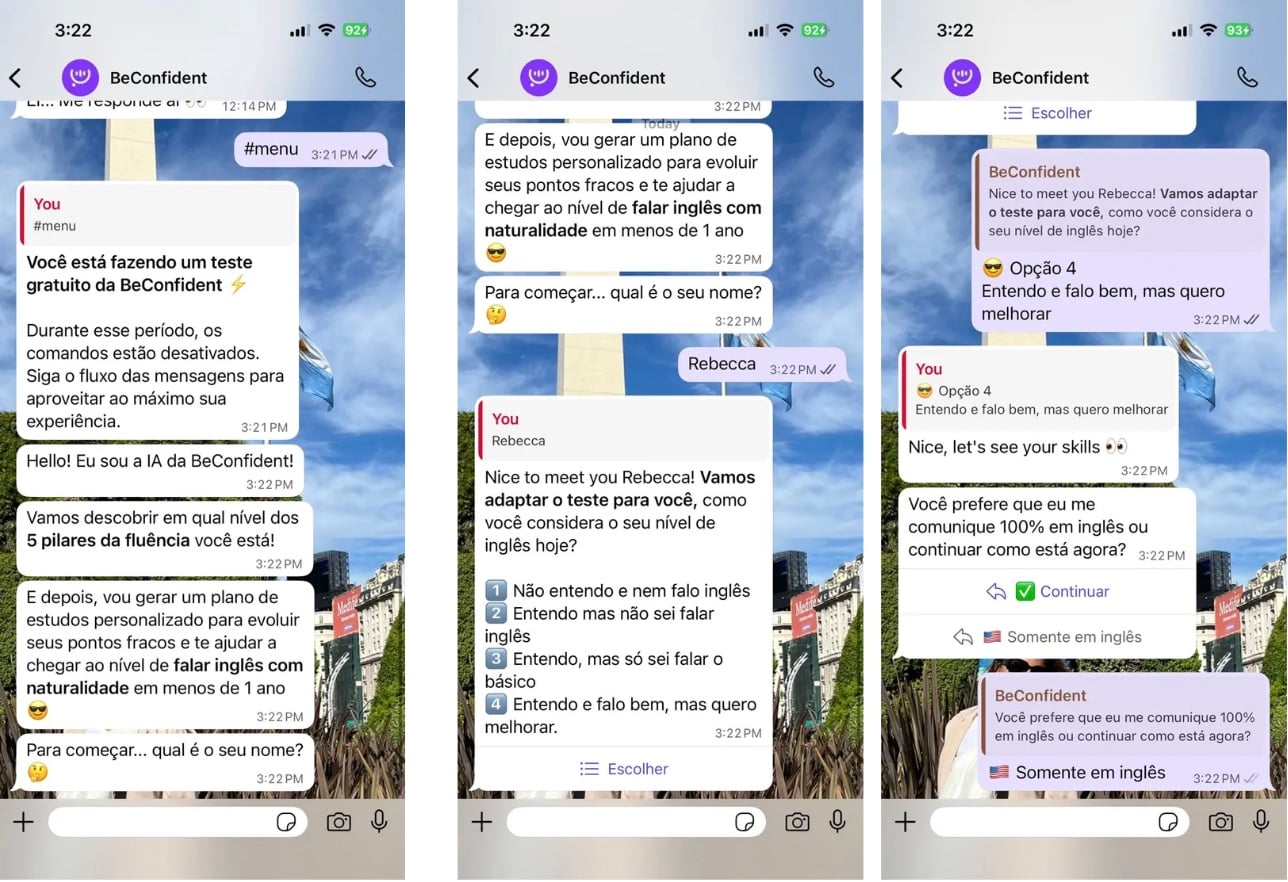
Test in conversation with BeConfident to verify if you can apply the corrected structures in real communication situations and receive instant feedback on pronunciation and naturalness.
Try BeConfident's free conversational feedback.
Practical tips and common mistakes
Common mistake: ignoring the tone of the text. Tools like Grammarly help with tone detection, but many users focus only on grammar and fail to adjust formality, closeness, and clarity.
Important tip: specifying the context in the prompt guides the tone. "Correct this email for my boss" generates a different result than "correct this message for a friend," and this difference ensures the appropriate tone mentioned above.
For Brazilians: special attention to suffixes. It is worth practicing pairs like "competition" (noun) and "competitive" (adjective), "decision" (noun) and "decisive" (adjective), which typically cause confusion for Portuguese speakers.
Technical vocabulary: using specific prompts for your field improves accuracy. A request like "review this engineering text" activates more appropriate technical vocabulary than generic prompts and generates suggestions more aligned with your professional context.
Why does BeConfident help with proofreading and fluency?
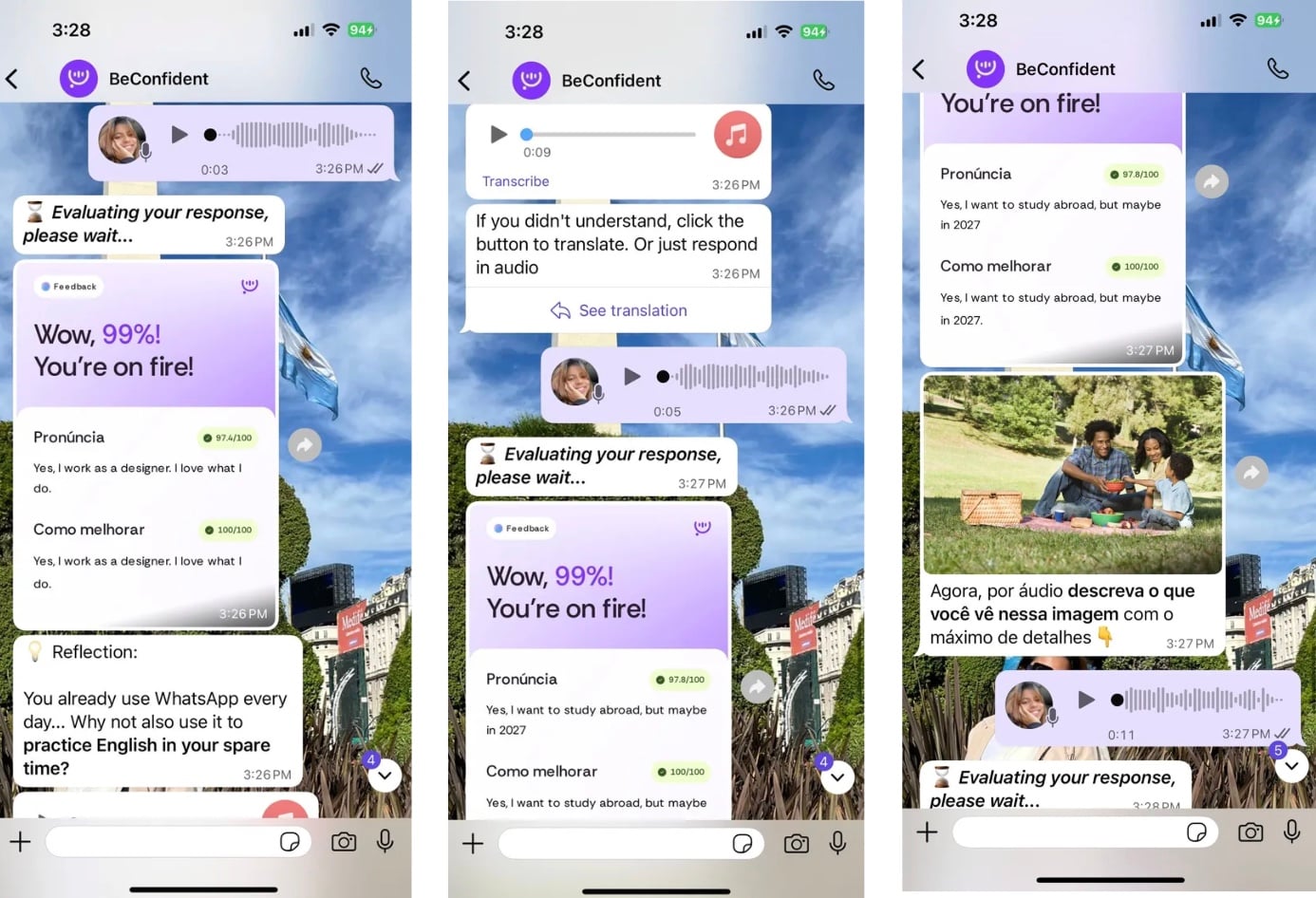
Traditional tools correct static texts, whereas BeConfident adds instant feedback in real conversations. With an already consolidated user base, the platform allows you to review errors in live chats, practice pronunciation with customized AI tutors, and develop conversational fluency at any time.
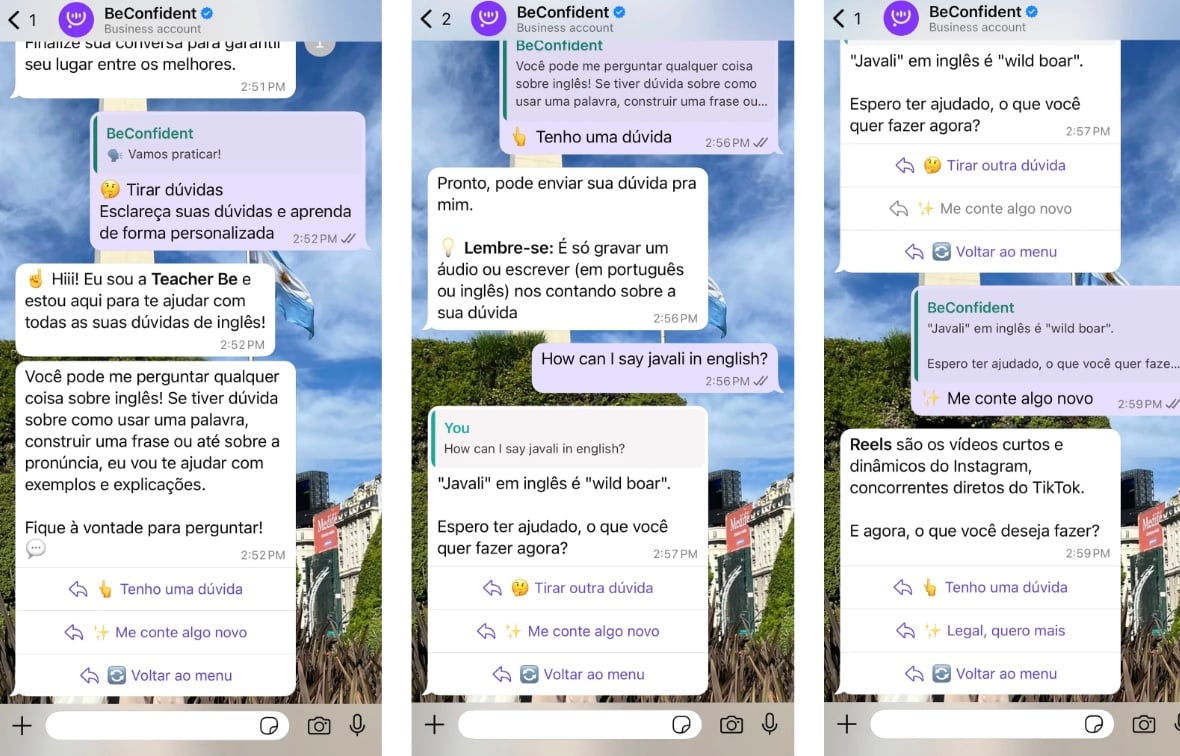
BeConfident stands out from Duolingo, which focuses on basic exercises, and Cambly, which tends to have higher costs and limited hours. The platform integrates text review with oral practice, which allows you to send messages via WhatsApp or the app, receive immediate corrections, and also get suggestions to sound more natural.
The platform maintains an RA 1000 reputation on Reclame Aqui and offers tutors with different accents, such as American, British, and Australian. This variety prepares you for real international communication situations.
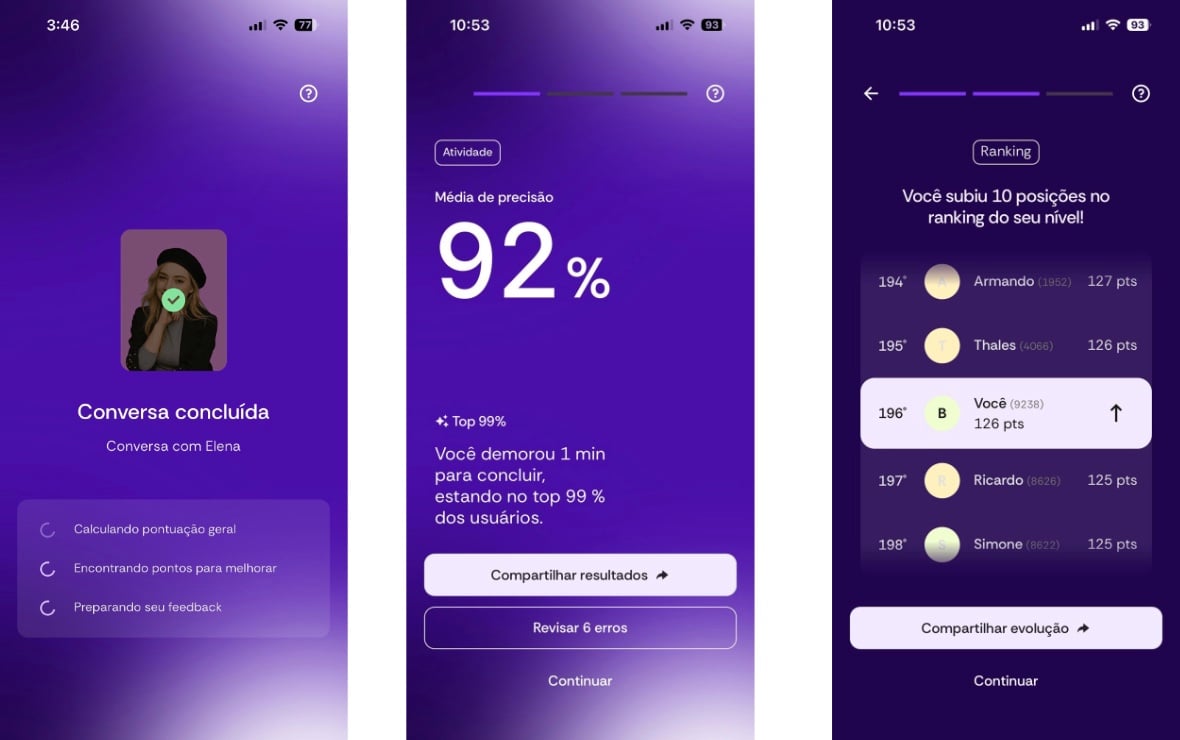
Test the integration between text proofreading and conversation on BeConfident.
How to measure progress and solve common problems?
Indicators of improvement include a reduction in basic grammatical errors, increased confidence on work calls, and a greater ability to express complex ideas without long pauses. Research shows that personalized AI feedback reduces cognitive load and increases engagement for intermediate-level learners.
Common problem: loss of cultural context in translation. BeConfident reduces this problem by personalizing feedback according to your professional area and your specific goals, which includes examples and expressions suited to your daily life.
Frequently Asked Questions
What is the best free AI to review English texts?
For general use, Grammarly offers unlimited corrections and tone detection on the free plan. For deep rewriting, it is worth using ChatGPT with specific prompts. To integrate review with conversation practice, BeConfident offers a free trial focusing on real use of the language.
Can ChatGPT correct English texts effectively?
Yes, especially with well-structured prompts. ChatGPT explains errors, suggests alternatives, and adapts the tone according to context. This combination is useful for texts that need significant rewriting or detailed explanations of corrections.
Does BeConfident review written texts or just conversation?
BeConfident reviews both text and conversation. You can send written messages and receive instant corrections, as well as practice the pronunciation of the corrected text with AI tutors. This integration between text review and speaking development is one of the platform's key differentiators.
Can I use multiple AI tools together?
Yes, and this combination usually brings better results. You can use Grammarly for basic corrections, ChatGPT for deep rewriting, and BeConfident to practice the corrected text in conversation. Each tool contributes specific strengths.
How long does it take to see improvement in writing using AI?
With consistent use of about 15 minutes daily, most users notice a reduction in basic errors in 2 to 3 weeks. For integrated conversational fluency, practicing with BeConfident accelerates the process because you apply text corrections in real communication situations.
Conclusion
Using AI to review English texts means going beyond the occasional correction of errors and building practical fluency. Combining free tools like Grammarly and ChatGPT with conversational practice from BeConfident continuously strengthens your professional and personal communication.
Start your free trial on BeConfident and connect text review with speaking English.
Written by: Luan Cavallaro, Founder & CMO, BeConfident
Key takeaways from this article
Grammatical errors can harm your career, and free AI tools like Grammarly and ChatGPT help correct these issues quickly.
Using specific prompts for different contexts, such as professional emails or technical reports, increases feedback accuracy by about 60%.
Following the 5-step workflow—paste the text, apply the prompt, analyze explanations, practice speaking, and test in conversation—produces more consistent learning.
Combining tools like Grammarly for basic corrections, ChatGPT for rewriting, and BeConfident for oral practice with instant feedback creates a complete package.
To seek complete fluency, it is worth trying BeConfident for free and integrating text review with 24/7 conversation.
Before you begin: what you need to know
This guide works best for those with an intermediate level of English, access to free AI apps, and the availability to practice 10 to 15 minutes a day. Studies from 2026 indicate that the strategic use of AI for feedback on texts accelerates fluency development in just a few weeks.
The most common mistake is translating texts without understanding the grammatical patterns. Portuguese speakers frequently confuse word forms because of incorrect suffixes, such as using "confident" (adjective) when they need "confidence" (noun). To reduce this type of error, it is useful to choose tools that explain the reason behind each correction.
Best AI tools for proofreading English texts
The table below compares the main free tools available in 2026, focusing on text proofreading and learning support:
Tool | Free plan | Accuracy/features | Ideal for |
|---|---|---|---|
Grammarly | Unlimited but basic | 4.9/5 for proofreading, tone detection | General and professional use |
DeepL Write | Yes | Natural rewording, style adjustment | Clarity and fluidity |
ChatGPT | Yes | Deep rewriting, detailed explanations | Customized prompts |
BeConfident | Free trial, affordable monthly fee | Feedback in chats, pronunciation support | Conversation and speaking |
Grammarly offers unlimited grammar and spelling checks on the free plan, with basic tone detection, while ChatGPT allows personalized paraphrasing and rewrites. BeConfident stands out for conversational texts and speaking practice, offering instant feedback in chats and supporting a consolidated user base.
10 ready-made prompts to review English texts
These prompts work well in tools like ChatGPT and other English text AIs:
Professional emails: "Review this email in English: [paste text]. Correct grammar, improve the professional tone, and explain the main errors."
Technical reports: "Analyze this technical text in English: [paste text]. Correct terminology, improve clarity, and suggest more precise vocabulary."
Presentations: "Review this presentation: [paste text]. Make the text more persuasive, correct errors, and suggest transitions between ideas."
Social media posts: "Correct this post: [paste text]. Keep a casual tone, correct grammar, and suggest relevant hashtags."
Motivation letters: "Review this letter: [paste text]. Improve the impact, correct errors, and make the text more convincing."
Academic articles: "Analyze this academic text: [paste text]. Correct grammar, improve the argumentation, and suggest formal vocabulary."
Commercial proposals: "Review this proposal: [paste text]. Make the text more persuasive, correct errors, and improve the structure."
WhatsApp messages: "Correct this message: [paste text]. Keep it natural and correct basic errors."
Resumes: "Review this resume: [paste text]. Correct grammar, improve the impact, and suggest action verbs."
Creative texts: "Analyze this creative text: [paste text]. Correct errors, improve flow, and maintain creativity."
Structured prompts with specific context generate feedback that is about 60% more accurate than vague instructions. Because of this, it is always worth specifying the type of text, audience, and objective.
Recommended 5-step workflow
This 5-step workflow organizes the use of AI tools and connects written proofreading with speaking practice:
Paste the text into the chosen tool, using Grammarly for basic corrections and ChatGPT for a deeper rewrite. This step centralizes content in one single place.
Use the specific prompt from the previous list according to the objective of the text. This choice guides the AI, defines the tone, and increases the relevance of the corrections.
Analyze the explanations of the errors to identify recurring patterns and understand the reason for each adjustment. This understanding reduces the chance of repeating the same mistake in the future.
Practice speaking the revised text out loud to build muscle memory of the correct structures. This practice turns passive knowledge into active use.
Test in conversation with BeConfident to verify if you can apply the corrected structures in real communication situations and receive instant feedback on pronunciation and naturalness.
Try BeConfident's free conversational feedback.
Practical tips and common mistakes
Common mistake: ignoring the tone of the text. Tools like Grammarly help with tone detection, but many users focus only on grammar and fail to adjust formality, closeness, and clarity.
Important tip: specifying the context in the prompt guides the tone. "Correct this email for my boss" generates a different result than "correct this message for a friend," and this difference ensures the appropriate tone mentioned above.
For Brazilians: special attention to suffixes. It is worth practicing pairs like "competition" (noun) and "competitive" (adjective), "decision" (noun) and "decisive" (adjective), which typically cause confusion for Portuguese speakers.
Technical vocabulary: using specific prompts for your field improves accuracy. A request like "review this engineering text" activates more appropriate technical vocabulary than generic prompts and generates suggestions more aligned with your professional context.
Why does BeConfident help with proofreading and fluency?
Traditional tools correct static texts, whereas BeConfident adds instant feedback in real conversations. With an already consolidated user base, the platform allows you to review errors in live chats, practice pronunciation with customized AI tutors, and develop conversational fluency at any time.
BeConfident stands out from Duolingo, which focuses on basic exercises, and Cambly, which tends to have higher costs and limited hours. The platform integrates text review with oral practice, which allows you to send messages via WhatsApp or the app, receive immediate corrections, and also get suggestions to sound more natural.
The platform maintains an RA 1000 reputation on Reclame Aqui and offers tutors with different accents, such as American, British, and Australian. This variety prepares you for real international communication situations.
Test the integration between text proofreading and conversation on BeConfident.
How to measure progress and solve common problems?
Indicators of improvement include a reduction in basic grammatical errors, increased confidence on work calls, and a greater ability to express complex ideas without long pauses. Research shows that personalized AI feedback reduces cognitive load and increases engagement for intermediate-level learners.
Common problem: loss of cultural context in translation. BeConfident reduces this problem by personalizing feedback according to your professional area and your specific goals, which includes examples and expressions suited to your daily life.
Frequently Asked Questions
What is the best free AI to review English texts?
For general use, Grammarly offers unlimited corrections and tone detection on the free plan. For deep rewriting, it is worth using ChatGPT with specific prompts. To integrate review with conversation practice, BeConfident offers a free trial focusing on real use of the language.
Can ChatGPT correct English texts effectively?
Yes, especially with well-structured prompts. ChatGPT explains errors, suggests alternatives, and adapts the tone according to context. This combination is useful for texts that need significant rewriting or detailed explanations of corrections.
Does BeConfident review written texts or just conversation?
BeConfident reviews both text and conversation. You can send written messages and receive instant corrections, as well as practice the pronunciation of the corrected text with AI tutors. This integration between text review and speaking development is one of the platform's key differentiators.
Can I use multiple AI tools together?
Yes, and this combination usually brings better results. You can use Grammarly for basic corrections, ChatGPT for deep rewriting, and BeConfident to practice the corrected text in conversation. Each tool contributes specific strengths.
How long does it take to see improvement in writing using AI?
With consistent use of about 15 minutes daily, most users notice a reduction in basic errors in 2 to 3 weeks. For integrated conversational fluency, practicing with BeConfident accelerates the process because you apply text corrections in real communication situations.
Conclusion
Using AI to review English texts means going beyond the occasional correction of errors and building practical fluency. Combining free tools like Grammarly and ChatGPT with conversational practice from BeConfident continuously strengthens your professional and personal communication.
Start your free trial on BeConfident and connect text review with speaking English.