




How can I use AI to correct my English automatically?
How can I use AI to correct my English automatically?
How can I use AI to correct my English automatically?
Written by: Luan Cavallaro, Founder & CMO, BeConfident
Key takeaways from this article
AI is already changing the way we correct English mistakes, providing instant feedback and detailed explanations that go beyond traditional tools.
ChatGPT works well for occasional text corrections utilizing specific prompts, but it does not offer continuous conversational practice.
BeConfident focuses on spoken conversation, featuring personalized AI tutors, 24/7 correction, and structured progress tracking.
A daily routine of 5 to 10 minutes with different AIs accelerates fluency in grammar, pronunciation, and the use of natural expressions.
To achieve concrete conversational results, it is worth trying BeConfident for free and transforming mistakes into confidence when speaking English.
Best AIs for automatic English error correction
The leading AI tools for correcting English mistakes meet different study and practice needs.
1. BeConfident
BeConfident specializes in spoken and written conversation with personalized AI tutors. The platform serves over 200,000 paying students and maintains a RA 1000 reputation on Reclame Aqui. It offers 24/7 automatic correction via app, WhatsApp, or smartwatch. Major benefits include unlimited conversational practice, multiple accents, and judgment-free feedback.
2. Grammarly and DeepL
These tools focus on real-time text correction with high grammatical accuracy. Key positives include an intuitive interface and browser integration. The main limitation is their exclusive focus on written text, without oral or conversational practice.
3. ChatGPT
ChatGPT provides personalized correction through specific prompts. You can request correction with detailed explanations to better understand the mistakes made. Its strength lies in contextual explanations. The limitation is the lack of structured progress tracking.
4. LanguageTool and QuillBot
These tools serve as free alternatives featuring paraphrasing and basic correction capabilities. The main benefits are free access and support for multiple languages. However, the features in the free version are limited.
5. Google Translate
Google Translate is useful for basic translations and general text comprehension. However, the tool is limited when it comes to detailed corrections and structured English learning.
Try BeConfident's conversation tool for free and see in practice how real-time correction impacts your fluency.
How to use ChatGPT to correct English mistakes
ChatGPT provides personalized correction through well-crafted prompts. Following a simple step-by-step process helps you get the most out of this resource.
1. Access ChatGPT
Enter the platform and start a new conversation. This is the starting point for any type of correction.
2. Use effective prompts
After opening the conversation, the quality of the correction depends directly on how you formulate the request. Effective prompts include:
"Correct this English text and explain the mistakes: [your text]"
"I am a non-native speaker. Correct the grammar, spelling, and unnatural phrasing, and suggest alternatives: [your text]"
"List only grammatical errors without rewriting: [your text]"
"Analyze this audio transcription and suggest pronunciation improvements: [transcript]"
3. Analyze the corrections
Observing the before and after helps reinforce learning. Here is a practical example.
Original text: "I am interesting in this job because I have experience on marketing."
Correction: "I am interested in this job because I have experience in marketing."
Explanation: "Interesting" works as an adjective to describe something, while "interested" expresses a personal feeling. The appropriate preposition is "experience in" to indicate an area of knowledge.
Limitations
ChatGPT does not offer continuous conversational practice or progress tracking over time. The tool works best for occasional text corrections and clarifying specific questions.
Correcting English mistakes in conversation with AI: why BeConfident stands out
To correct errors in real conversations, BeConfident offers a comprehensive solution focused on speaking and continuous interaction. The step-by-step guide below shows how to use the platform.
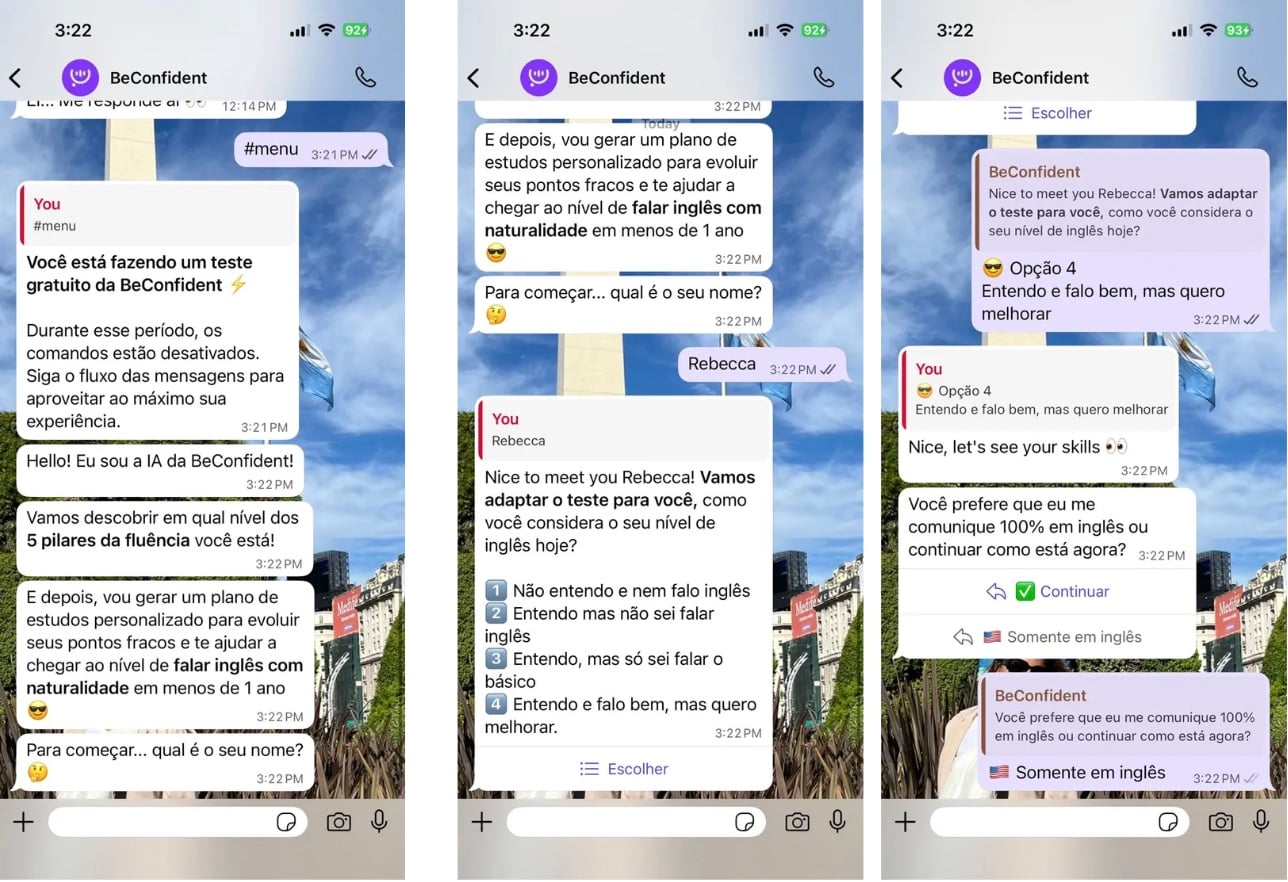
1. Take the free test
Go to beconfident.app and complete the quiz in Portuguese and English. The system identifies your CEFR level, from A1 to C2, and provides a personalized analysis highlighting strengths and areas for improvement.
2. Choose your AI tutor
Select a tutor with an American, British, Australian, Canadian, South African, or Indian accent. You can also choose profiles from different professional fields, such as a lawyer, photographer, or writer, aligned with your interests.
3. Start the conversation
Set a topic or receive automatic suggestions. Talk by typing, recording audio messages, or making simulated calls, choosing the format that best fits your routine.
4. Get instant correction
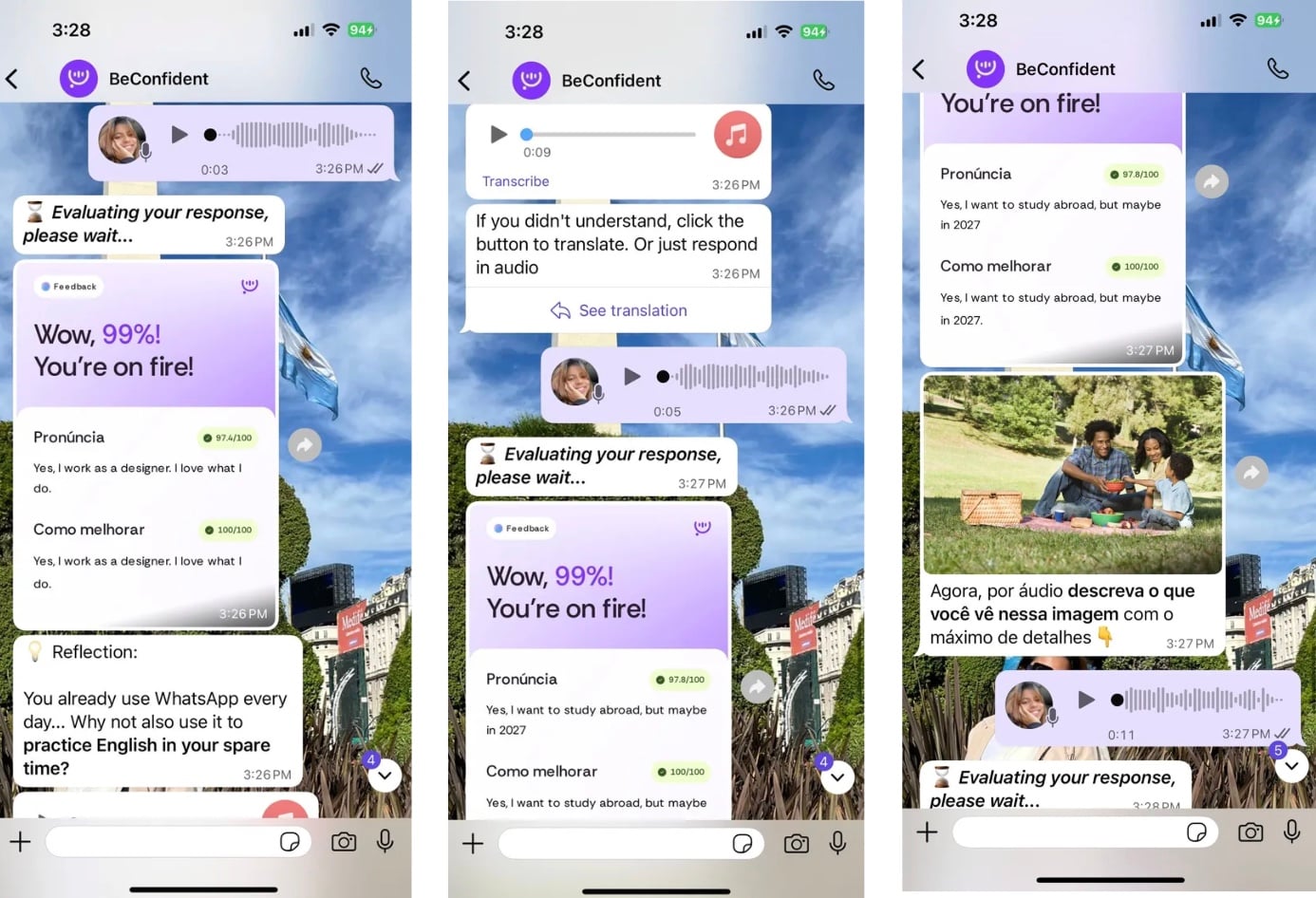
BeConfident offers immediate feedback on grammar and pronunciation without interrupting the natural flow of the conversation. Correction happens in real time as you speak or write.
5. Review your mistakes
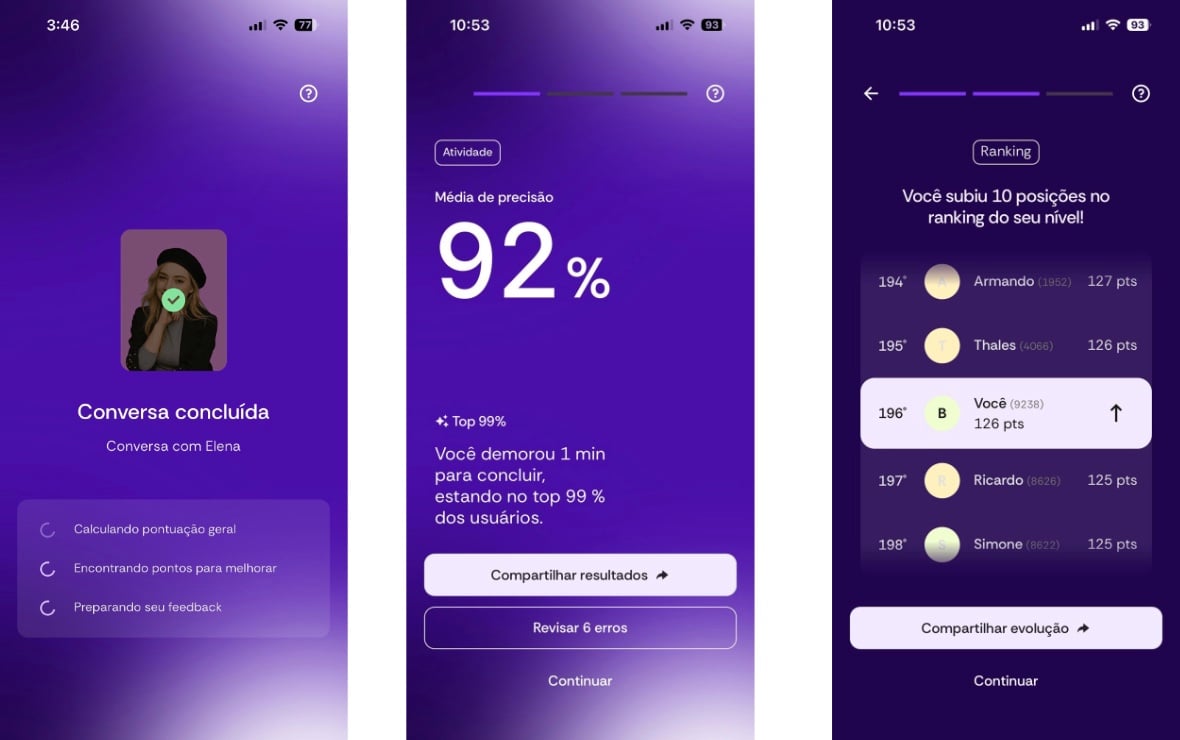
The "Review Errors" feature allows you to analyze detailed feedback on grammar, pronunciation, and native expressions. You can repeat the review as many times as you deem necessary.
6. Track your progress
The "My Progress" menu displays your streak days, ranking position, practice hours, and earned certificates. These metrics help you maintain consistency and give you clear insight into your progress.
Exclusive features
Continuous practice, with 24/7 access via app, WhatsApp, or smartwatch
Judgment-free environment, with a personalized AI that encourages frequent practice
Structured learning paths, combining theory and application in real-world situations
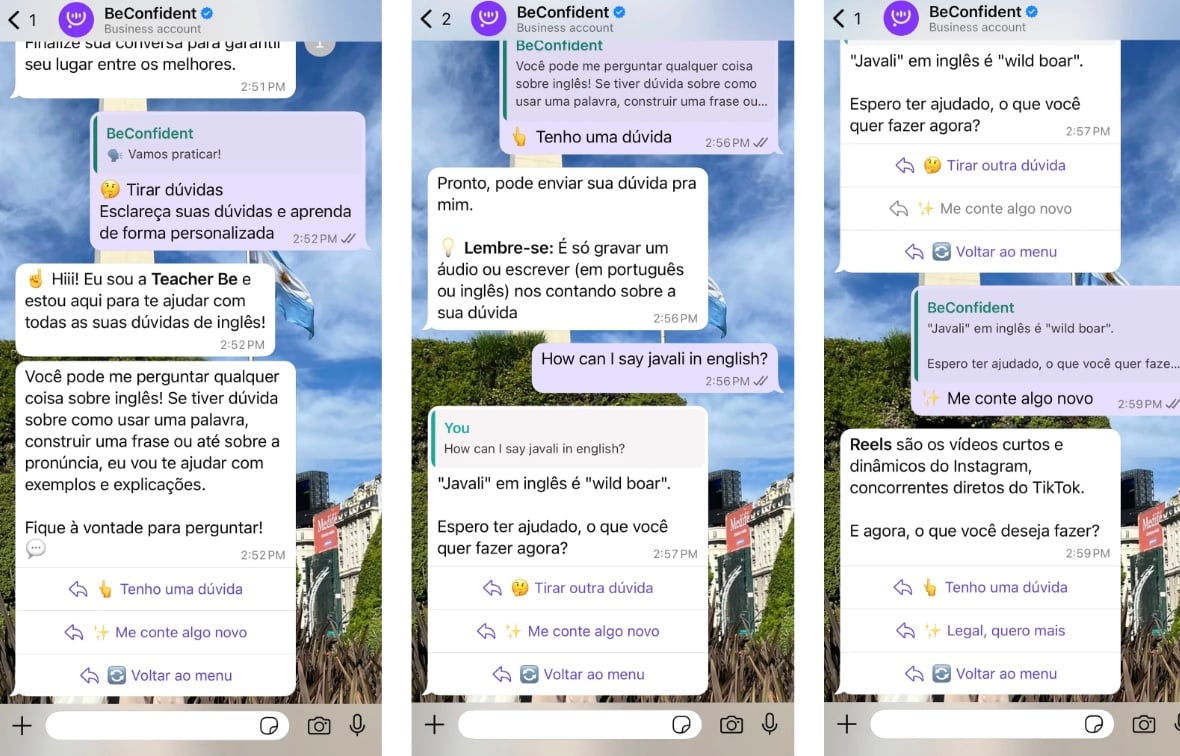
"I have a question" function, for immediate clarifications during the conversation
"Tell me something new" command, to expand your vocabulary and range of topics
Start your free trial now and practice speaking with the same technology that already supports hundreds of thousands of students.
Comparison: BeConfident vs. other tools
The following table summarizes the key differences among the most widely used AI tools, highlighting where each contributes to fluency and where BeConfident offers advantages in real-world conversation.
Tool | Automatic Correction | Oral Practice | Price / Real Fluency |
BeConfident | Grammar and pronunciation 24/7 | Unlimited, with multiple accents | Low cost per practice hour, with streaks and tracking |
Grammarly | Text only | Not offered | Freemium model, focused on static correction |
ChatGPT | Correction via text prompts | Limited practice | Freemium model, without dedicated fluency tracking |
Duolingo | Basic gamified correction | Reduced oral practice | Free version, focused on vocabulary rather than full fluency |
BeConfident stands out as a solution focused on real conversation with instant automatic correction, offering great value to develop consistent fluency.
Tips for correcting spoken errors and next steps
A few simple adjustments in your routine can greatly increase how much you benefit from error correction during conversation.
Practice with varied accents
Exposing yourself to different native accents expands your auditory comprehension and adaptability in communication. This variety prepares you for real-world situations with speakers from different regions.
Use conversational prompts
Once you get used to different accents, the next step is to make conversations flow more naturally. Phrases like "I have a question about..." or "Tell me something new about..." keep the dialogue moving and make practice more educational.
Set realistic goals
Setting aside 5 to 10 minutes a day builds consistency without overwhelming your schedule. This daily frequency produces rapid gains in fluency over a few weeks.
Leverage technology in your daily life
BeConfident allows for multitasking practice via smartwatch, making it easy to study while cooking, walking, or doing other light activities.
Apply a practical tip right now
Copying a ready-to-use prompt helps you start without getting stuck. Use: "Let's chat about [your topic of interest]. Correct me if I make mistakes and explain why."
Try BeConfident for free to correct English mistakes automatically and transform your routine into continuous moments of practice.
Frequently Asked Questions
What is the best free AI English corrector?
For text correction, ChatGPT offers good free quality when using specific prompts. For conversation and real-world fluency, BeConfident offers a comprehensive free trial that identifies your level and opens up practice with personalized AI tutors. Combining both tools covers both text and speech effectively.
How to use AI to correct pronunciation?
BeConfident specializes in pronunciation correction through conversations with AI tutors who provide instant feedback. You can record audio, make simulated calls, or chat via WhatsApp and receive immediate corrections on accent, intonation, and clarity. The system recognizes different native accents and adjusts corrections to your level.
Does ChatGPT correct English text?
ChatGPT corrects English text with high accuracy. You can use prompts like "Correct and explain the errors: [your text]" or "I am Brazilian, correct the grammar and suggest more natural sentences: [text]". The tool provides detailed explanations for each adjustment, helping you understand and avoid the same mistakes in the future.
Does BeConfident correct mistakes automatically?
BeConfident offers immediate automatic correction during conversations 24/7. AI tutors identify grammar mistakes, pronunciation errors, and unnatural phrasing in real time, giving feedback without disrupting the conversation's flow. Later, you can review all items in the "Review Errors" section.
What is the best AI for spoken mistakes?
BeConfident is one of the most complete AIs for correcting spoken mistakes, offering a judgment-free environment and personalized tutors. Unlike tools focused only on text, the platform was developed for oral conversation, powered by technology that processes speech in real time and provides feedback on pronunciation, fluency, and naturalness.
Transforming mistakes into fluency is a continuous process, but it becomes simpler with the support of specialized AI. Start your free trial today and practice a few minutes a day to speak English naturally.
Written by: Luan Cavallaro, Founder & CMO, BeConfident
Key takeaways from this article
AI is already changing the way we correct English mistakes, providing instant feedback and detailed explanations that go beyond traditional tools.
ChatGPT works well for occasional text corrections utilizing specific prompts, but it does not offer continuous conversational practice.
BeConfident focuses on spoken conversation, featuring personalized AI tutors, 24/7 correction, and structured progress tracking.
A daily routine of 5 to 10 minutes with different AIs accelerates fluency in grammar, pronunciation, and the use of natural expressions.
To achieve concrete conversational results, it is worth trying BeConfident for free and transforming mistakes into confidence when speaking English.
Best AIs for automatic English error correction
The leading AI tools for correcting English mistakes meet different study and practice needs.
1. BeConfident
BeConfident specializes in spoken and written conversation with personalized AI tutors. The platform serves over 200,000 paying students and maintains a RA 1000 reputation on Reclame Aqui. It offers 24/7 automatic correction via app, WhatsApp, or smartwatch. Major benefits include unlimited conversational practice, multiple accents, and judgment-free feedback.
2. Grammarly and DeepL
These tools focus on real-time text correction with high grammatical accuracy. Key positives include an intuitive interface and browser integration. The main limitation is their exclusive focus on written text, without oral or conversational practice.
3. ChatGPT
ChatGPT provides personalized correction through specific prompts. You can request correction with detailed explanations to better understand the mistakes made. Its strength lies in contextual explanations. The limitation is the lack of structured progress tracking.
4. LanguageTool and QuillBot
These tools serve as free alternatives featuring paraphrasing and basic correction capabilities. The main benefits are free access and support for multiple languages. However, the features in the free version are limited.
5. Google Translate
Google Translate is useful for basic translations and general text comprehension. However, the tool is limited when it comes to detailed corrections and structured English learning.
Try BeConfident's conversation tool for free and see in practice how real-time correction impacts your fluency.
How to use ChatGPT to correct English mistakes
ChatGPT provides personalized correction through well-crafted prompts. Following a simple step-by-step process helps you get the most out of this resource.
1. Access ChatGPT
Enter the platform and start a new conversation. This is the starting point for any type of correction.
2. Use effective prompts
After opening the conversation, the quality of the correction depends directly on how you formulate the request. Effective prompts include:
"Correct this English text and explain the mistakes: [your text]"
"I am a non-native speaker. Correct the grammar, spelling, and unnatural phrasing, and suggest alternatives: [your text]"
"List only grammatical errors without rewriting: [your text]"
"Analyze this audio transcription and suggest pronunciation improvements: [transcript]"
3. Analyze the corrections
Observing the before and after helps reinforce learning. Here is a practical example.
Original text: "I am interesting in this job because I have experience on marketing."
Correction: "I am interested in this job because I have experience in marketing."
Explanation: "Interesting" works as an adjective to describe something, while "interested" expresses a personal feeling. The appropriate preposition is "experience in" to indicate an area of knowledge.
Limitations
ChatGPT does not offer continuous conversational practice or progress tracking over time. The tool works best for occasional text corrections and clarifying specific questions.
Correcting English mistakes in conversation with AI: why BeConfident stands out
To correct errors in real conversations, BeConfident offers a comprehensive solution focused on speaking and continuous interaction. The step-by-step guide below shows how to use the platform.
1. Take the free test
Go to beconfident.app and complete the quiz in Portuguese and English. The system identifies your CEFR level, from A1 to C2, and provides a personalized analysis highlighting strengths and areas for improvement.
2. Choose your AI tutor
Select a tutor with an American, British, Australian, Canadian, South African, or Indian accent. You can also choose profiles from different professional fields, such as a lawyer, photographer, or writer, aligned with your interests.
3. Start the conversation
Set a topic or receive automatic suggestions. Talk by typing, recording audio messages, or making simulated calls, choosing the format that best fits your routine.
4. Get instant correction
BeConfident offers immediate feedback on grammar and pronunciation without interrupting the natural flow of the conversation. Correction happens in real time as you speak or write.
5. Review your mistakes
The "Review Errors" feature allows you to analyze detailed feedback on grammar, pronunciation, and native expressions. You can repeat the review as many times as you deem necessary.
6. Track your progress
The "My Progress" menu displays your streak days, ranking position, practice hours, and earned certificates. These metrics help you maintain consistency and give you clear insight into your progress.
Exclusive features
Continuous practice, with 24/7 access via app, WhatsApp, or smartwatch
Judgment-free environment, with a personalized AI that encourages frequent practice
Structured learning paths, combining theory and application in real-world situations
"I have a question" function, for immediate clarifications during the conversation
"Tell me something new" command, to expand your vocabulary and range of topics
Start your free trial now and practice speaking with the same technology that already supports hundreds of thousands of students.
Comparison: BeConfident vs. other tools
The following table summarizes the key differences among the most widely used AI tools, highlighting where each contributes to fluency and where BeConfident offers advantages in real-world conversation.
Tool | Automatic Correction | Oral Practice | Price / Real Fluency |
BeConfident | Grammar and pronunciation 24/7 | Unlimited, with multiple accents | Low cost per practice hour, with streaks and tracking |
Grammarly | Text only | Not offered | Freemium model, focused on static correction |
ChatGPT | Correction via text prompts | Limited practice | Freemium model, without dedicated fluency tracking |
Duolingo | Basic gamified correction | Reduced oral practice | Free version, focused on vocabulary rather than full fluency |
BeConfident stands out as a solution focused on real conversation with instant automatic correction, offering great value to develop consistent fluency.
Tips for correcting spoken errors and next steps
A few simple adjustments in your routine can greatly increase how much you benefit from error correction during conversation.
Practice with varied accents
Exposing yourself to different native accents expands your auditory comprehension and adaptability in communication. This variety prepares you for real-world situations with speakers from different regions.
Use conversational prompts
Once you get used to different accents, the next step is to make conversations flow more naturally. Phrases like "I have a question about..." or "Tell me something new about..." keep the dialogue moving and make practice more educational.
Set realistic goals
Setting aside 5 to 10 minutes a day builds consistency without overwhelming your schedule. This daily frequency produces rapid gains in fluency over a few weeks.
Leverage technology in your daily life
BeConfident allows for multitasking practice via smartwatch, making it easy to study while cooking, walking, or doing other light activities.
Apply a practical tip right now
Copying a ready-to-use prompt helps you start without getting stuck. Use: "Let's chat about [your topic of interest]. Correct me if I make mistakes and explain why."
Try BeConfident for free to correct English mistakes automatically and transform your routine into continuous moments of practice.
Frequently Asked Questions
What is the best free AI English corrector?
For text correction, ChatGPT offers good free quality when using specific prompts. For conversation and real-world fluency, BeConfident offers a comprehensive free trial that identifies your level and opens up practice with personalized AI tutors. Combining both tools covers both text and speech effectively.
How to use AI to correct pronunciation?
BeConfident specializes in pronunciation correction through conversations with AI tutors who provide instant feedback. You can record audio, make simulated calls, or chat via WhatsApp and receive immediate corrections on accent, intonation, and clarity. The system recognizes different native accents and adjusts corrections to your level.
Does ChatGPT correct English text?
ChatGPT corrects English text with high accuracy. You can use prompts like "Correct and explain the errors: [your text]" or "I am Brazilian, correct the grammar and suggest more natural sentences: [text]". The tool provides detailed explanations for each adjustment, helping you understand and avoid the same mistakes in the future.
Does BeConfident correct mistakes automatically?
BeConfident offers immediate automatic correction during conversations 24/7. AI tutors identify grammar mistakes, pronunciation errors, and unnatural phrasing in real time, giving feedback without disrupting the conversation's flow. Later, you can review all items in the "Review Errors" section.
What is the best AI for spoken mistakes?
BeConfident is one of the most complete AIs for correcting spoken mistakes, offering a judgment-free environment and personalized tutors. Unlike tools focused only on text, the platform was developed for oral conversation, powered by technology that processes speech in real time and provides feedback on pronunciation, fluency, and naturalness.
Transforming mistakes into fluency is a continuous process, but it becomes simpler with the support of specialized AI. Start your free trial today and practice a few minutes a day to speak English naturally.